
Converting Books Into Visual Novels Part 0: The pulp.txt Format
Feb 13, 2026
This will be the first in a series of posts explaining my processes for how I convert books into visual novels. See the full series links over on the website's README.md.
The post date above represents the publication date of this entry's first draft, but I intend the posts of this series to all be living documents, continually updated over time as I figure out better and more efficient techniques, both on the manual and automation side of things.
For this first entry, I'll go into not the processes themselves, but the prerequisite for understanding them: the pulp.txt file, the "code" underlying each visual novel.
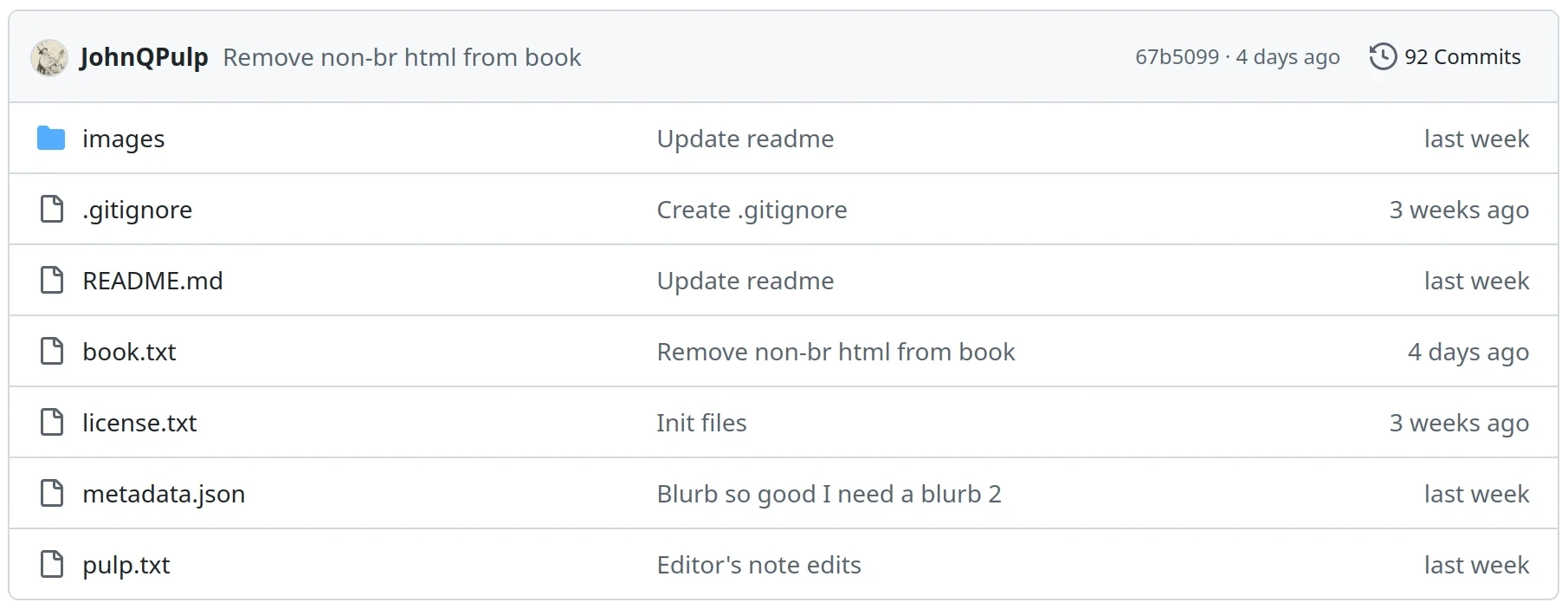
Each visual novel repo contains a pulp.txt file and a book.txt file, which are together consumed by the Pulpifier in order to build the VN-formatted html output.
The book.txt is essentially just the original text of the book, the output of pandoc-converting a Standard Ebooks .epub into a .txt file. (Using the gfm-raw_html target format, along with some other flags, and also some manual cleanup, that I'll all describe in more detail in the next part.)
Here's a book.txt example snippet:
### VII

As I started up the stairs the concierge knocked on the glass of the door of her lodge, and as I stopped she came out. She had some letters and a telegram.

“Here is the post. And there was a lady here to see you.”

“Did she leave a card?”

“No. She was with a gentleman. It was the one who was here last night. In the end I find she is very nice.”

“Was she with a friend of mine?”

“I don’t know. He was never here before. He was very large. Very, very large. She was very nice. Very, very nice. Last night she was, perhaps, a little—” She put her head on one hand and rocked it up and down. “I’ll speak perfectly frankly, Monsieur Barnes. Last night I found her not so *gentille*. Last night I formed another idea of her. But listen to what I tell you. She is *très, très gentille*. She is of very good family. It is a thing you can see.”

“They did not leave any word?”

“Yes. They said they would be back in an hour.”

“Send them up when they come.”

“Yes, Monsieur Barnes. And that lady, that lady there is someone. An eccentric, perhaps, but *quelqu’une, quelqu’une*!”
The main features to note are that:
- The file alternates between text lines and blank lines.
- Each text line represents one paragraph.
- Raw markdown symbols are included, such as
*italics*and## Headings.
The book.txt file is the reference file — the source of truth that the Pulpifier compares the pulp.txt file against. The corresponding pulp.txt snippet for this chunk is:
### VII
r=title

As I started up the stairs the concierge knocked on the glass of the door of her lodge, and as I stopped she came out.
b=flat-concierge-int

She had some letters and a telegram.
n:concierge1=Concierge;c=concierge1;e:concierge1=happy

“Here is the post. And there was a lady here to see you.”
s=concierge1

“Did she leave a card?”
s=jake

“No. She was with a gentleman. It was the one who was here last night. In the end I find she is very nice.”
s=concierge1;e:concierge1=happy

“Was she with a friend of mine?”
s=jake

“I don’t know. He was never here before. He was very large. Very, very large.”
s=concierge1

“She was very nice. Very, very nice.”


“Last night she was, perhaps, a little—”
e:concierge1=thinking

She put her head on one hand and rocked it up and down.
s=none;c=

“I’ll speak perfectly frankly, Monsieur Barnes. Last night I found her not so *gentille*. Last night I formed another idea of her.”
s=concierge1;e:concierge1=serious;c=concierge1

“But listen to what I tell you. She is *très, très gentille*. She is of very good family. It is a thing you can see.”
e:concierge1=happy

“They did not leave any word?”
s=jake;e:jake=contemplative

“Yes. They said they would be back in an hour.”
s=concierge1

“Send them up when they come.”
s=jake

“Yes, Monsieur Barnes. And that lady, that lady there is someone. An eccentric, perhaps, but *quelqu’une, quelqu’une*!”
s=concierge1;e:concierge1=happy
Note how the pulp.txt file:
- Alternates text line, metadata line, blank line; repeat. So a 3-cycle instead of
book.txt's 2-cycle. Together, we'll call each of these 3-cycle groupings a slide. - Contains the exact* same text content, including the same markdown, as
book.txt. (One of the functions of the Pulpifier is to check the combined text contents ofpulp.txtagainstbook.txtto make sure no transcription or editing mistakes accidentally changed the original text.) - Contains more slides than the original
book.txt, despite containing the same overall text. For whilebook.txt's contents represent whole paragraphs,pulp.txt's represent individual slides of the visual novel. Thus, for visual presentation purposes, we want long paragraphs split up.
The text lines and their associated metadata define all aspects of the visual novel's presentation. In this case, one example slide looks like this:
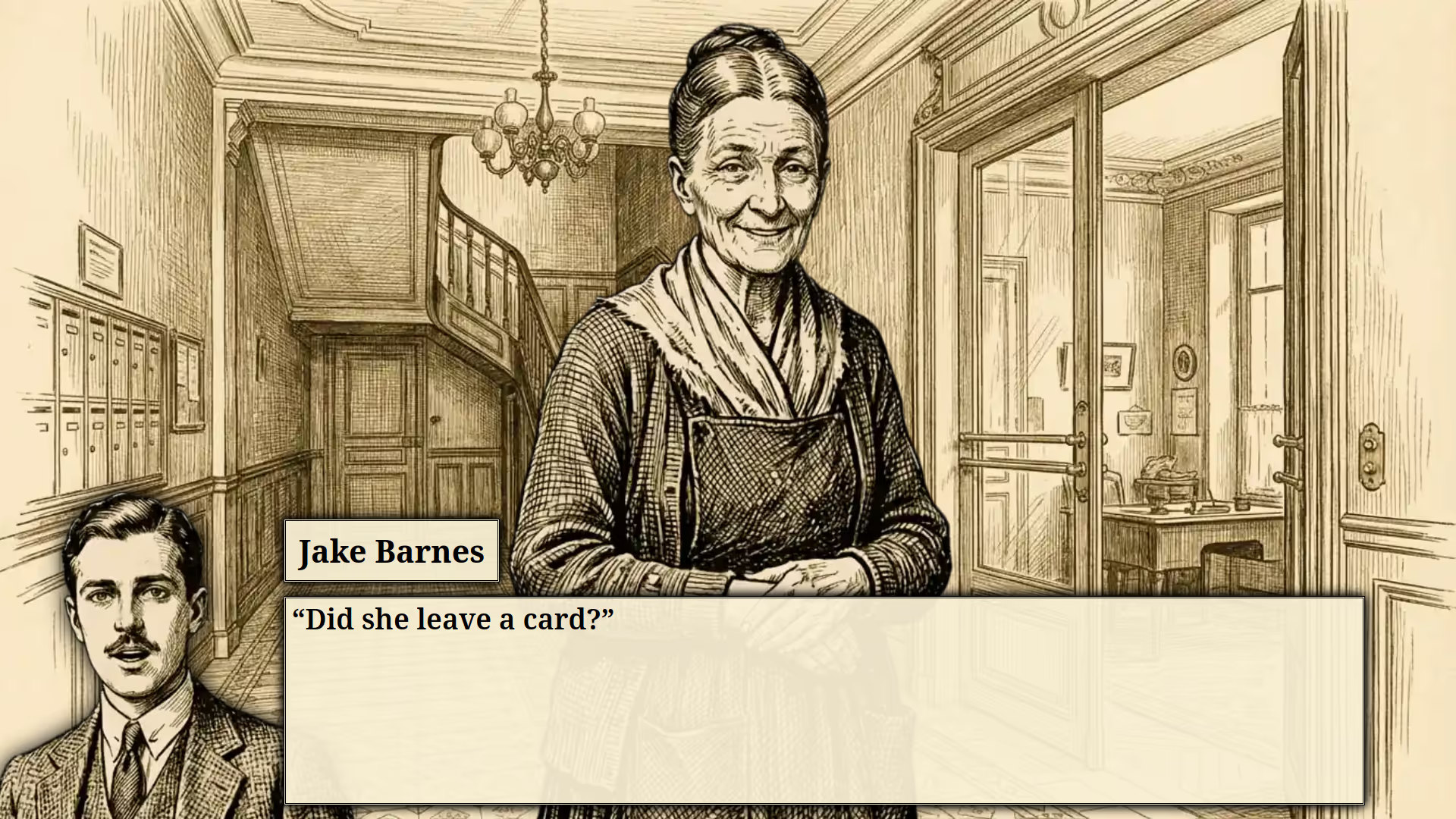
This fifth slide of the example snippet can be explained as a combination of the text of that particular text line along with its metadata line and the 4 lines of metadata before it. Walking through this specific example will help give a high-level overview of how the pulp.txt format with its metadata tags works, before going into the specific documentation of each tag.
- The first slide's
r=titleuses the (r)eset tag to reset most metadata to its default state. This is important because certain metadata carries over from slide-to-slide, and so you'll usually see the resets at the beginning of each chapter, as those act as clear refresh points. The=titlepart is the tag telling the VN to use the title-card background for the chapter header slide. - The second slide's
b=flat-concierge-intuses the (b)ackground tag to set the VN to the interior flat lobby background. (r)eset and (b)ackground both set a background, but (b)ackground only sets the background — it doesn't affect any other metadata. Either way, once the background has been set, it stays with that background until changed again. So since none of the subsequent slides change the background, it's that same background that the 5th slide will end up using. - The third slide's
n:concierge1=Concierge;c=concierge1;e:concierge1=happyuses three new tags (separated by semicolons, which act as the tags' dividers) to do the following things:n:concierge1=Conciergeuses the (n)ame tag to define a new character with the IDconcierge1with the user-displayed name of "Concierge".c=conciergeuses the (c)haracter tag to setconcierge1as the on-screen character.e:concierge1=happyuses the (e)xpression tag to setconcierge1's state tohappy, such that while on-screen, her appearance will use her "happy" sprite set.
s=concierge1uses the (s)peaker tag to set the speaker toconcierge1. During this slide, her name will appear on-screen as the speaker and her character will use a speaking sprite (c-concierge-ehappy-s.webp, taking into account the previous slide).s=jakeupdates the speaker tojake, a character defined in a previous chapter (who therefore doesn't need to be redefined). Since his character isn't on-screen, he'll appear in the lower-left corner "speaker box", where he can be seen in his neutral speaking expression, since no specific expression was set.
All together, you can see how the relatively simple metadata annotations of the pulp.txt file can fully control the appearance of the book's visual novel.
And simplicity is the main goal of the format: text files are simple to read, simple to edit, simple to commit and diff, and simple to generate. (In subsequent parts, I'll discuss the role of LLMs in visual novel creation.)
So jumping off from this example, let's go through each pulp.txt metadata tag in detail:
The Metadata Tag Lines
The overall format for the metadata tags is k=value or k:name=value or k=val1,val2,…,valN or k:name=val1,val2,…,valN.
k is the tag key, a single-letter identifier for which tag is being set e.g., b for background or c for characters. Some tags like background accept a single value argument (you can only set one background at-a-time), whereas others like characters can accept one or many or even zero (e.g., c=belmonte,romero,marcial sets three characters to be on-screen at once).
Why are tag keys limited to only one character, you ask? Well, that's a good question. Anyway…
Some tags like e (expression) take a required name parameter as the first argument, written like e:romero=happy. These name-requiring parameters tags can also set multiple values, like the z (zoom) tag for setting character sprite positioning metadata e.g., z:hubertfather=94,49,3. Functionally, there isn't really difference between the name-requiring and non-name-requiring tags except insofar as how they're written. Theoretically the format could instead be e=romero,happy and z=hubertfather,94,49,3, and they'd still just be tags accepting arguments like the others, but having the names be a visually distinct first parameter helps improve readability.
Metadata lines are made up of sets of metadata tags, ranging from zero to many per line, separated by semicolons. A valid metadata line might be completely blank, or it might have lots of delimited tags like:
s=bill;e:bill=;c=bill;v=100,115;z:bill=103
The tags are read left-to-right, and processed in that order, so if for whatever reason a metadata line sets the same tag twice like s=bill;s=jake, it's the second value that wins out. (Though there isn't any reason to do this in practice, and I might change it to just be a parsing error later on.)
Now let's go through all the individual tags and explain how they work and how they relate to each other and the text lines:
(b)ackground
b accepts exactly one argument, setting the background like b=flat-ext. This presumes the existence of a background image file named b-flat-ext.webp.
The set background will remain the active background until changed by a subsequent b or r tag.
(n)ame
n accepts two arguments, a character identifier and a display name e.g., n:mike=Michael Campbell. This acts as the declaration of a new character, allowing the identifier to be used in subsequent tags. (Which otherwise throw undeclared identifier errors.)
An identifier cannot be undeclared, but the display name can be changed over time, if for example a character's name is revealed in stages. You might have the display start off as n:jake=? for an unnamed character, then switch to n:jake=Jake once you learn their first name, and then finally n:jake=Jake Barnes.
(c)haracters
c accepts zero-to-five arguments, establishing which all characters are on-screen, using previously declared character identifiers. If for example you set c=jake, then the VN will display the c-jake.webp sprite centered horizontally on top of the background.
Providing zero arguments like c= removes all on-screen characters.
Providing more than one argument like c=jake,brett positions characters using a slot system where, given N arguments, the character in slot X is positioned at X/(N+1) of the way horizontally on the screen. In this case, jake in slot 1 is positioned at the 1/3 horizontal position, and brett in slot 2 is set at the 2/3 position. With five slots, any fractional position up to denominator of 6 is allowed. It's even possible to leave slots empty like c=,,brett, which puts brett at the 3/4 position, leaving the 1/4 and 2/4 positions unfilled. In this way, along with the v tag, the positioning of on-screen characters can be controlled.
Now you might think this scheme of combining the character on-screen status and positioning metadata into one tag with "blank slots" is utterly confusing and stupid.
(o)bject
o accepts zero or one arguments, placing an object sprite on screen like o=trout for o-trout.webp. Unlike backgrounds, objects don't cover the whole screen, but sit, horizontally centered, on top of both the background and characters. Like with backgrounds, they stay on-screen until another o tag is set, either switching to a different object, or removing any object via o=.
(e)xpression
e accepts a required name argument (a previously declared character identifier) and an expression/emotion string e.g., e:jake=happy. This tells the VN to use the c-jake-ehappy.webp sprite when that character is on-screen. The expression state remains active on that character until changed.
A character can be reset to their neutral state (e.g., c-jake.webp) by setting either e:jake= with no value or e:jake=neutral using the special neutral keyword value.
(a)ge
a works similarly to e, but acts as another dimension by which to set character traits. Also accepting an identifier and string like a:robert=old, this instructs the VN to use image files like c-robert-aold.webp; or, when combined with an active expression, like c-robert-aold-eweary.webp. (It can also be reset by setting a:robert=.)
e(x)tras
x works similarly to e and a, acting as a third dimension by which to set character traits. It accepts an identifier and zero or more extra modifiers like x:belmonte=longjaw,capeless, instructing the VN to use the sprite c-belmonte-xcapeless-xlongjaw.webp (note the alphabet sorting for different extra attributes). It combines with the other two above tags to form full sprite names like c-belmonte-aold-xcapeless-xlongjaw-eserious.webp. (x can also be reset by setting x:belmonte=.)
(s)peaker
s accepts zero or one argument, defining the active speaker like s=jake if there is one, or setting the speaker to no one like s= or s=none.
When a character is speaking, they'll appear on-screen. Where they appear depends on if they're already on-screen as a c tag argument. If they are already part of that set of on-screen characters, they'll appear speaking as they are, whichever slot c has positioned them in. If they aren't already on-screen though, they'll appear in the lower-left corner speaker box.
When a character is speaking, their associated image file will have a suffix like -s or -s2 or -s3. This combines with the above three tags to form full file names like c-belmonte-aold-xcapeless-xlongjaw-eserious-s.webp. As you can see, these files can get quite long all put together, which is why it's useful to have these four tags all settable separately, and leave the actual specific file name construction to the Pulpifier, rather than having to set a full file name for each sprite update to any of the character characteristics.
Suffix Variations
The -s, -s2, and -s3 thing is from a feature of the Pulpifier whereby if a character speaks for multiple slides without changing their expression, the displayed sprite image file will swap between different speaker variations, such that you don't have the same static image file across large swathes of dialogue. Visually, while a character is speaking, it's nice to have their sprite change with each slide, even if only slightly, so as to indicate the active speaker status.
The pattern for the speaker suffix variations is the following sequence: -s to -s2 to -s to -s2 to -s3 to -s to -s3 to -s2. And then it repeats.
These variations on the speaker can also affect non-speaker sprites, if a character is the active character list, and their sprite exits dialogue, but stays in the same expression. In that case, a suffix is appended to match the speaker variation that just finished speaking: -1 for -s, -2 for -s2, and -3 for -s3. The idea with this is that it's nice to keep a character in the same general pose after they've finished speaking, just updating their mouth to be closed, to prevent a character from continuing to bounce back to a single static non-speaking sprite, over the course of talking.
Overall though, these variations are more of an implementation detail about what all sprites the Pulpifier processes its tags as, and so can be ignored for the purposes of just understanding the metadata tag attributions themselves.
(t)hinker
t is similar to s in its format (e.g., t=jake) and that it puts characters in the speaker box if not on-screen. However, unlike s, that's all t does — it doesn't also update their status/file to be speaking. t is therefore mainly used for the cases where an author says that a character is thinking something, but does so while still using dialogue-type quotes e.g.:
"The most human of all human traits is inconsistency," he thought.
t=henry
Both s and t while active cause the character's name to appear on-screen as e.g., "Henry" and "Henry (thinking)" respectively. Also, text without quotes is bolded while either tag is active, to make it visually easier to tell the dialogue from non-dialogue.
(z)oom
z accepts a name and then one then between one and four arguments, like z:swordguy=97 or z:critic=90,49,5. Not all the arguments need to be populated, so z:frances=,53,,97 is also a valid annotation, with the missing values staying as their default values.
The first number is either case represents the character's zoom level — how large they should appear on-screen, where 100 is the default. Since all character sprites are the same size — 1376x768 pixels — this sizing metadata is necessary for changing the effective height of characters to appropriate relative levels.
The second number represents the horizontal positioning of the character in their speaker box, where 50 is the default, and higher integers push the speaker to the left, and smaller integers push the speaker to the right. Why do the numbers work opposite to what you'd reasonably expect? Because backwards-compatibility stupidity.
The third number represents the vertical positioning of the character in their speaker box, where 0 is the default, and higher integers push the sprite up, and negative integers push it down.
The fourth character represents the character's zoom level within just the speaker box, where 100 is again the default. The way this works that if this value is unset, and the first value zoom is unset, the speaker box zoom is 100. If this fourth value is unset but the first value for the overall zoom is set, the speaker box zoom also uses that zoom level. So it's only when it's necessary to set the speaker box zoom to a different level than the overall zoom that this value is necessary.
(v)iew
v sets the horizontal spacing and vertical sizing and vertical spacing of characters while on-screen like v=90,125,40. Missing values are again allowed (e.g., v=90,,40 or v=90), where they represent the defaults for those values.
The first two arguments default to 100, where lowering the first value squeezes characters closer together and raising the first value moves them further apart. Lowering the second value decreases the size of sprites and raising it increases their size. The third value controls the vertical positions of the characters on-screen, with default 50, where higher values push the sprites down more, and lower ones raise them up.
(f)ilter
There are two different types of filters, reflected in two different ways to use the f tag:
First, the f tag's key can specify a custom css filter to pair either with a specific character (e.g., f:c:jake=blur(5px)) or a specific background (e.g., f:b:flat-ext=brightness(85%)). This will cause that custom css filter (which can be any valid css filter) to apply to that specific character's on-screen sprite or the specific background, until either reset back to no filter (e.g., f:b:flat-ext=) or the sprite and/or background go off-screen.
Second, the f tag can just specify a plain value like f=fade. In this case, the filter applies a pre-specified effect to the current slide, which can different forms. Running down the list of allowed effects:
fade: When moving to the next slide, the screen will fade to black and then fade back into the new slide, rather than switching immediately. (Note that this filter is automatically applied when entering or exiting a frame narrative level.)hit: When the slide with the hit-filter comes on-screen, the background will temporarily blur and then unblur, representing a sort of hitting or crashing effect.blood: When the slide with blood-filter comes on-screen, the background will temporarily flash transparent red before returning to a normal color, representing a sort of spilling of blood.lightning: When the slide with the lightning filter comes on-screen, the background will temporarily have a large brightness (>100%) effect applied before returning to a normal level.
Also note that, when one of these special filter effects is applied to a slide, other filter effects (including the default quick-fade effect for switching backgrounds) are disabled.
(m)odifier
m is a tag that allows the activation/deactivation of various parsing modifiers. For example, setting m= disables all modifiers (the default) and setting m=joined;m=margin enables the joined and margin modifiers. The available modifiers are:
margin: Causes the text display to have padding on either side, as a sort of quasi-blockquote effect.joined: Causes text from the current text line to feed into the next slide.nospace: Causes text from the current text line to not have an automatic space appended onto it when building the next slide.allowbreak(orbreak): Allows a line break to be placed where it otherwise wouldn't be permitted by the rules described further below.dialogue: Causes text within quotes to be formatted bold, like dialogue, even if there isn't an active speaker or thinker.nospeaker: Causes active speakers to not show sprites in the speaker box. (Used for example in representing a character speaking from another room or otherwise out-of-view. Will also probably be useful when doing the Invisible Man conversion.)
The modifier tag can also accept a second integer argument N like m=allowbreak,1, which tells the modifier to only apply for N slides before deactiving itself.
(h)eader
h is a tag similar to m in that it changes parsing behavior. However, unlike m, headers are meant to only be set once, at the beginning of the visual novel, and then don't ever change. Currently there's only one header:
no-speaker-counter: Causes speaker sprites to not swap between-s2and-s3variations. Likewise for post-speaker sprite-1and-2and-3variations.
(r)eset
r is a tag that is used the same way as background, accepting exactly one background image argument (e.g., r=flat-ext), but which also has a host of other effects. Essentially, r is for cleaning the slate of most of the above tags, setting them back to their default, making it easier to keep track of what is and isn't active when starting a new chapter or scene.
The only tags that r doesn't reset are the three permanent ones: n, h, and z; and then also the a tag, since while we don't expect a character's expression to persist between scenes, their current age generally should.
(i)ndex
i for "index" refers to the speaker counter index, with this tag being used to override the default sprite variation sequence — the one described above in the (s)peaker section.
Used without an argument, like i=2, it sets the sprite variation to use for the current speaker for the current line. Used with an argument, like i:jake=2, it sets the variation for a specific character, on-screen in either the active character list of the speaker box.
So for example if the variation counter would normally result in Jake's current emotion of angry showing the 3rd variation, c-jake-eangry-s3, but we set i:jake=2, then the VN will use c-jake-eangry-s2 instead. But importantly, this override only affects the current line. It does not carry over to subsequent lines like other metadata. (And therefore, doesn't apply to the (r)eset considerations of the prior section.
(g)ödel
The g tag uses "g", because "f" for "frame narrative" was already taken. But the idea is the same: of putting a VN window within a VN window.
g accepts one background-name argument like g=boarding-int, which creates an inner VN framing using that new background. Once inside a frame narrative, all tags continue to work the same, except that they apply only to the new inner frame window, rather than the outer frame, which is fixed in-place with whatever background and speaker sprite it had, prior to entering the frame narrative.
A frame narrative is exited by "popping" the frame off the stack with an empty argument like g=, but a second level of framing can also be "pushed" onto the frame stack to create an inner inner window. (But that's it: there's not yet support for inner inner inner windows, though it could be added!)
The purpose of the frame narrative is that it pushes dialogue one layer deeper, such that instead of bolding "outer" dialogue like “I went to the store.”, it bolds inner dialogue like the single-quote portion of “He said, ‘I went to the store.’” And inner inner frame narratives handle the quotes one layer deeper than that, even.
This all helps in situations where one character speaks at length, especially if their dialogue contains inner conversations between other characters, where you want the inner dialogue to be the one that's labeled, rather than the unchanging outer speaker.
The Text Lines
The text lines are the other half of the pulp.txt format in the overall "Text Line → Metadata Line → Blank Line" slide 3-cycle.
Text lines are never blank, but always have some text in them representing what should be on-screen for the current slide of the VN. The Pulpifier expects that the text on these lines adds up to exactly match the text of the original book.txt file, with a few important rules on how the "adding up" works.
Line Break Rules
Given an original book text paragraph like:
Frances Clyne was coming toward us from across the street. She was a very tall girl who walked with a great deal of movement. She waved and smiled. We watched her cross the street.
The pulp.txt file can choose to leave the text exactly as-is, or break it up into smaller chunks via sentence breaks e.g.:
Frances Clyne was coming toward us from across the street.


She was a very tall girl who walked with a great deal of movement. She waved and smiled.
e:frances=happy

We watched her cross the street.
Note how the pulp text lines don't end in spaces, even though in the original text, there are spaces between sentences. The Pulpifier inserts spaces automatically when building up the comparison string to make sure that the overall text is identical.
Also note how the second slide's pulp text line has multiple sentences still together. It's perfectly acceptable for a single line to have multiple sentences, and in that case they stay spaced the same. The only thing that isn't acceptable is inserting line breaks in-between sentences, like putting a break between "Frances Clyne was coming toward" and "us from across the street." — this would cause a parsing error. (However, the Pulpifier does allow splitting of sentences by characters such as em dashes, semicolons, colons, and even commas. Generally, this is undesirable — it's preferable to not split up single sentences in this way — but sometimes it can be unavoidable from a presentation perspective, and so if a split does need to happen, it should at least happen with the grammar.)
Quote Handling
When it comes to dialogue, things get slightly more complicated. Take for instance this book text:
“You mustn’t misunderstand, Jake, it was absolutely platonic with the secretary. Not even platonic. Nothing at all, really. It was just that she was so nice. And he did that just to please me. Well, I suppose that we that live by the sword shall perish by the sword. Isn’t that literary, though? You want to remember that for your next book, Robert.

“You know Robert is going to get material for a new book. Aren’t you, Robert? That’s why he’s leaving me. He’s decided I don’t film well. You see, he was so busy all the time that we were living together, writing on this book, that he doesn’t remember anything about us. So now he’s going out and get some new material. Well, I hope he gets something frightfully interesting.
Split up in the pulp format, it looks like this:
“You mustn’t misunderstand, Jake, it was absolutely platonic with the secretary. Not even platonic. Nothing at all, really. It was just that she was so nice.”
e:frances=smirking

“And he did that just to please me. Well, I suppose that we that live by the sword shall perish by the sword.”
e:frances=happy

“Isn’t that literary, though? You want to remember that for your next book, Robert.”


“You know Robert is going to get material for a new book. Aren’t you, Robert? That’s why he’s leaving me. He’s decided I don’t film well.”


“You see, he was so busy all the time that we were living together, writing on this book, that he doesn’t remember anything about us.”


“So now he’s going out and get some new material. Well, I hope he gets something frightfully interesting.”
Note how while in the original text, the dialogue had only two opening quotes and no closing quotes, the pulp text has a opening and closing quote on each text line. This is a necessary change in order to accommodate the visual novel format in a way that isn't confusing. Since we can't see the full dialogue all at once, we can't really follow the same literary quotation rules as books do. Otherwise we'd end up with lines with no quotes around them, even though they're dialogue.
On the topic, I'll just voice my opinion and say: the way literature handles dialogue spanning multiple paragraphs? Really dumb. But hey, all the more opportunity for visual novels to be superior.
In a book format, putting quotes around each individual line would change the effective speaker, since at that point the reader would interpret the dialogue as switching back-and-forth. In a visual novel though, this isn't a problem, because the speaker always appears with their name and sprite on-screen while talking — there's never any ambiguity. Therefore, adding additional quotes should never change the effective reading experience. The Pulpifier is also smart enough to know how to merge the extra quotes when rebuilding paragraphs for the comparison, and performs additional checks per each pulp text line to make sure the opening and closing quotes match.
The reason we care to still keep around quotes at all is that they're still needed for lines with combined dialogue and non-dialogue parts e.g.:
“What’s his name?” asked Brett. “Veuve Cliquot?”
s=brett

“No,” said the count. “Mumms. He’s a baron.”
s=count

“Isn’t it wonderful,” said Brett. “We all have titles. Why haven’t you a title, Jake?”
s=brett;e:brett=happy
The quotes here are still necessary for the reader to know what is and isn't being spoken. This is helped by bolding the text within the dialogue quotes, using the same font weight as the bold used for the speaker name text, so that it's visually obvious which parts are and aren't associated with the speaker.
Html Handling
Generally, most text lines don't need any particular custom html handling. The Pulpifier automatically converts *italics* and **uppercase** and ## Headers all to their appropriate html.
However, custom html is supported in the form of adding spans with class names as-needed for special cases. For example, the following pulp text is valid:
It had been forwarded from Paris:


<span class='uppercase'>Could you come Hotel Montana Madrid am rather in trouble Brett.</span>
The span html text is stripped from the text comparison with the original, such that it doesn't count as changing the text. Therefore, arbitrary css styling can be applied when needed.
Editor's Notes
Text lines can contain "Editor's Notes" formatted like:
“I reverse the order. For Bryan’s sake. As a tribute to the Great Commoner. First the chicken; then the egg.”<e>Based William Jennings Bryan reference.</e>
s=bill
The Pulpifier automatically converts the custom e tags into span-html, and also removes the e tag text from the original text comparison. This allows arbitrary Editor's Note text (or even html, including scripts!) to be added, though the notes aren't visible by default.
Footnotes
Footnotes/endnotes can be added similarly like:
“We Elders have many heifers,<f>Heber C. Kemball, in one of his sermons, alludes to his hundred wives under this endearing epithet.</f> but our children must also be provided.”
e:brigham=serious
Generally, fiction novels don't have many footnotes, if there are any in the original text, this will automatically insert an asterisk (or equivalent) where the f-tag starts, and move the text out to its own line, below the main text.